"Unable to connect to world" — why it happens and how to fix it
On this page
Minecraft shows this message for four completely different problems, and it does not tell you which one you have. A friend's world that will not let you in, a Realm that times out, a server that is running but unreachable, and a world that will not open at all all produce something beginning "Unable to connect". The fixes have almost nothing in common.
So this guide sorts you first and fixes second. Start with the quick answer below — it clears most cases in under a minute — then read the exact wording on your screen, because the words after "Unable to connect" are what tell you which of the four you are in.
The quick answer: three checks that fix most cases
Before any theory, do these three in order. Between them they clear the large majority of "Unable to connect to world" reports.
- Fully close and reopen Minecraft, then sign out and back into your Microsoft account. Not a return to the main menu — quit the app. The game's session with Xbox services goes stale surprisingly often, and a stale session produces exactly this message even when nothing is wrong with the world, the network or the server.
- Check that both sides are on the same Minecraft version. Consoles and phones update themselves, PCs often do not, and a version gap between you and whoever is hosting blocks the join outright. If the versions differ, updating the older side fixes it.
- If you are joining a friend, make sure the host is in the world right now. A friend-hosted world only exists while that friend has the game open and is inside it. If they are on the main menu, in another world, or their console is asleep, there is nothing to connect to.
Unable to connect to world
Minecraft has several separate messages here, and most write-ups treat them as one. They are not. Each comes from its own string in the game, and the differences are the diagnosis. These are the exact texts, as the game ships them:
| What your screen says | What it actually means |
|---|---|
| "Unable to connect to world." | The generic failure. A friend's world or a server did not accept the connection. Most of this guide is about this one. |
| "Unable to connect to the world. Please check your connection to the internet and try again." | The same idea shown on the loading screen instead of the disconnect screen. Note the "the" — a different message, not a typo. |
| "Unable to connect to world. The world is no longer available to join." | The session is gone. The host closed the world, left it, or dropped offline while you were joining. |
| "Unable to connect to Realm." / "Unable to connect to Realms." | A Realms problem, not a world problem — the Realms service or that specific Realm. A different branch entirely. |
| "Unable to connect." | The screen title above any of the above. Read the line underneath it; that is the part that identifies your case. |
People write this down in a lot of ways when they go looking for help — "cant connect to world", "minecraft unable to connect to world bedrock", "unable to connect to the world" — and they are all this same screen. What matters is the sentence after the first one, because that is the part that changes.
Which of the four problems do you actually have?
Two questions sort you into the right branch. Answer them from what is on your screen, not from what you assume the problem is.
- Does the message say "Realm" or "Realms"? If it does, this is the Realms branch — the Realms service, the subscription, or that particular Realm. Nothing below about ports or Xbox privacy applies. If the Realm belongs to somebody else, they are the only one who can fix it.
- Did you join from your Friends list, or from an address you typed in? A world you reach through the Friends tab is hosted on another player's device — go to joining a friend's world. A world you reach by typing an IP and port on the Servers tab is a dedicated server — go to joining a server you typed the address for.
The fourth case is rarer and separate: your own single-player world will not open and shows a connection error. That is not a networking problem at all — it is a local world or storage problem, and none of the fixes on this page apply to it.
One of the four is structural rather than a setting: a world that lives on someone's console only exists while that person is sitting in it. A server does not have that failure mode — it stays up whether anyone is online or not. HytHost Bedrock hosting starts at €2.59 a month.
See Bedrock hosting plansJoining a friend's world
This is the most common version of the problem and the one fewest write-ups cover properly. When you join through the Friends tab, the world is running on your friend's console, phone or PC — there is no server anywhere. Everything below follows from that one fact.
1. The host has to be in the world, right now
The world exists only while your friend has Minecraft open and is inside that world. On the main menu, in a different world, or with the console asleep, there is nothing running for you to reach. If you get "Unable to connect to world. The world is no longer available to join.", this is almost certainly it — that wording means the session disappeared.
2. Xbox account privacy (the one that traps parents)
Bedrock multiplayer runs through Xbox services, so an Xbox privacy setting can block the join even though the game, the network and the world are all fine. On an account registered as a child this is the default state, not a mistake anybody made. The setting is "You can join multiplayer games", and it has to be set to Allow.
- Sign in at account.xbox.com/settings. For a child account the family organiser has to sign in with their own account — the child cannot change these.
- Open Privacy & online safety, then the Xbox One/Windows 10 Online Safety tab.
- Set "You can join multiplayer games" to Allow, and save.
- On the Privacy tab, the rows governing whether others can see you online and can send you invites matter too, because that is how a Friends-list join is offered in the first place. If a friend cannot invite you or cannot see you, that is where it is blocked.
3. Both accounts have to be signed in to Xbox services
Both sides need to be actually signed in, not merely launched. If either one shows as signed out or stuck signing in, fix that first — a half-signed-in client fails the join with the generic message and no explanation of why.
4. Version gap
If your friend's device updated and yours did not, the join fails. Sometimes the game says so plainly — "The host is using an older version of Minecraft. Everyone should update to the latest version of Minecraft and try again." — but not always, so compare the version numbers on both devices even when the message is generic.
5. Console network type
If everything above is right and it still fails only for people outside your home, look at the NAT type in the console's network settings. A strict or closed NAT blocks the peer-to-peer connection this kind of join depends on. It is worth knowing that this is the one cause on the list you cannot fix from inside the game — it lives in the router.
Joining a server you typed the address for
If you added the server on the Servers tab by IP and port, the causes are completely different and no Xbox privacy setting is involved. Work down this list in order — it is ordered by how often each one turns out to be the answer.
1. The port has to match
The server-port line in server.properties must equal the port the host allocated to that server. Bedrock's default is 19132, but a hosted server is frequently on something else, and editing server-port to a value the host has not allocated makes the server unreachable while it still looks perfectly healthy in the panel. Put it back to the allocated port and restart.
The server itself tells you which port it really opened. Its startup log carries these two lines, and the first number is the one your players need:
[INFO] IPv4 supported, port: 19132: Used for gameplay and LAN discovery
[INFO] IPv6 supported, port: 19133: Used for gameplay
2. Bedrock is UDP, so most "is it online" tests lie to you
telnet or TCP nc test, probes TCP. A "closed" result from one of those is not evidence of anything, and it has sent plenty of people off to reinstall a server that was never broken. Test with a tool that queries Bedrock over UDP, or simply have somebody try to join.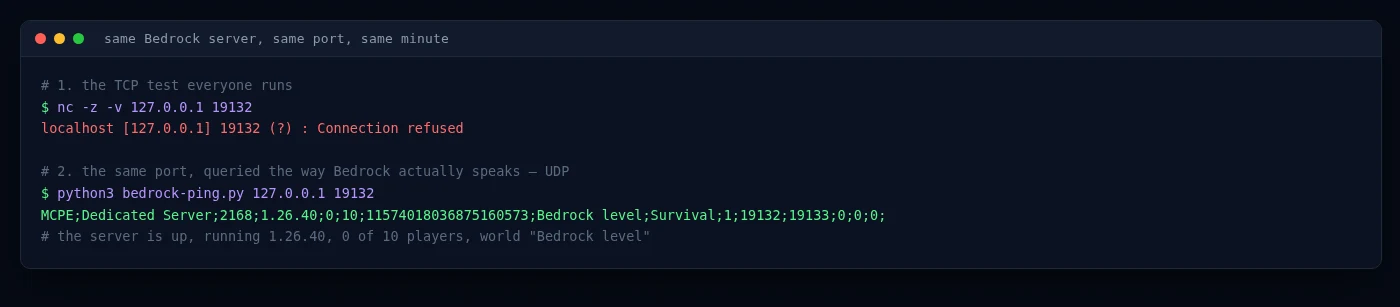
1.26.40, players online and world name. Only the second test tells you anything.3. The server has to actually be running
Check the state in the control panel rather than trusting that it started. A server that crashed on boot, is still starting, or has been suspended presents to the client as an unreachable address — the same generic message a wrong port produces.
4. Version mismatch between client and server
Bedrock clients refuse to connect to a server on a different version, and consoles and phones update themselves the day a release lands. So the morning after a Minecraft update, a server that has not been brought up to match locks everyone out at once. Update the server to the version your players are on.
5. If you get in but the world is wrong
That is a different symptom with a different cause: level-name in server.properties has to match the folder name under worlds/. When it does not, the server generates a fresh empty world instead of loading yours. Everything looks connected because it is — you are simply in the wrong world.
Why a dedicated server removes this whole class of problem
Worth saying plainly, because it is a mechanism rather than a sales point: most of what goes wrong above is a consequence of where the world lives, not of a setting somebody got wrong.
When the world runs on a friend's console, it is only up while that person is sitting in it. Everyone else's access then depends on their console being awake, their internet holding, their NAT type, their Xbox privacy settings and their patch level. Five people's evening hangs on one person's device. Nobody misconfigured anything — that is simply how a peer-hosted world works.
Move the same world onto a server and those dependencies disappear rather than get fixed:
- The world is up when nobody is online, so anyone can play whenever they like.
- There is one fixed address instead of a host who has to be present.
- Nobody sits behind anybody else's router, so NAT type stops being a factor.
- The version becomes one thing you control, rather than whatever the host's device updated itself to.
This is not an argument that every group needs a server — plenty are perfectly happy with one person hosting, and if you are weighing this against a Realm, that comparison has its own guide. It is an argument that if this is the third evening you have lost to "unable to connect to world", the thing you are fighting is structural, and no amount of setting-changing retires it.
A Bedrock server on managed hosting is online whether anyone is or not, keeps one address that does not change, and sits behind nobody's home router. Backups and DDoS protection are included, and moving an existing world across is free. From €2.59 a month.
Start a Bedrock serverMy message is slightly different
Neighbouring errors that look similar and are not. Match the exact wording, then follow where the row sends you.
| Message on screen | Cause | Where to go |
|---|---|---|
| "You're not invited to play on this server." | The server's allowlist is on and you are not on it | The allowlist section of the Bedrock guide |
| "The connection to the host was lost." | You were connected and the host went away — closed the world, lost internet, or crashed | Ask the host; there is nothing to fix on your side |
| "Could not connect: Outdated client!" | Your game is older than the server | Update your game |
| "The host is using an older version of Minecraft…" | The other side is behind | The host or the server operator updates |
| "Wow this server is popular! Check back later to see if space opens up." | The server is at its player limit | Raise max-players if the server is yours |
| You connect fine, but the world is brand new and empty | level-name does not match the folder under worlds/ | The server section above |
| Phone and PC can join, but Xbox, PlayStation or Switch cannot | Consoles cannot type a custom server address at all | How players connect on the Bedrock guide |
Frequently asked questions
The message covers several unrelated failures. When joining a friend it usually means the host is not currently in that world, one of the two accounts has an Xbox privacy setting blocking multiplayer, or the two devices are on different Minecraft versions. When joining a server by address it usually means server-port does not match the allocated port, the server is not running, or the server is on a different version than the client. The sentence after "Unable to connect" identifies which case it is.
They are two separate messages from two separate strings in the game. "Unable to connect to world." appears on the disconnect screen. "Unable to connect to the world. Please check your connection to the internet and try again." appears on the loading screen while the join is still in progress. Their causes overlap, so the same checks apply to both.
"You can join multiplayer games", under Privacy and online safety in the Xbox One/Windows 10 Online Safety tab at account.xbox.com/settings, has to be set to Allow. On an account registered as a child it is restricted by default and only the family organiser can change it. The change is not applied instantly — it can take from minutes to several hours to reach the game.
Because Bedrock uses UDP and generic port checkers test TCP. A TCP probe against a Bedrock port fails whether or not the server is healthy, so its result carries no information either way. Verify with a tool that queries Bedrock over UDP, or by having somebody attempt to join.
That wording means the session ended between the moment the world appeared in your list and the moment you tried to enter it. The host closed the world, left it, switched worlds, or lost their connection. Nothing on the joining side can restore it — the host has to reopen the world.
No. That exact wording belongs to Bedrock Edition, which is the version on consoles, phones and the Microsoft Store "Minecraft for Windows" app. Java Edition reports connection failures differently, and it does not gate multiplayer access behind Xbox privacy settings.
It removes the causes that come from the world being hosted on a player's own device — the host having to be online, their router's NAT type, and their account settings. It does not remove version mismatches, which apply to any server, or a mistyped address. Server-side causes such as a wrong port remain possible, but those are configuration you control rather than conditions on somebody else's machine.
Stop depending on whoever is hosting
A Bedrock server that is online whether anyone else is or not — one address, no NAT, no waiting for the host to log in. DDoS protection and one-click backups included, and moving an existing world across is free.
Live chat 8 AM – 11 PM (Chișinău time) · tickets answered during business hoursWas this guide helpful?

