Best Minecraft Server Software: Vanilla vs Paper vs Spigot vs Forge vs Fabric
On this page
- The two families of server software (plus proxies)
- Vanilla vs Paper vs Spigot vs Purpur vs Forge vs Fabric at a glance
- The plugin family up close: Vanilla, Paper, Spigot and Purpur
- The mod family: Forge, NeoForge and Fabric
- Which should you run? A 30-second decision
- Changing your mind later takes one click
- FAQ
"Best Minecraft server software" has no single answer — it comes down to one question: do you want plugins, mods, or neither? Get that right and the choice between Vanilla, Paper, Spigot, Purpur, Forge and Fabric almost makes itself. Get it wrong and you fight your server for weeks.
This guide sorts every option into plain groups, compares them side by side, and ends with a one-line decision flow so you can pick in under a minute. The short version: most people should run Paper — but here is exactly when you should not, and why switching later takes a single click anyway.
The two families of server software (plus proxies)
Almost every server file you can download falls into one of three groups. Two of them decide how your world plays; the third only matters once you run more than one server. Get the group right first — the specific name inside it is the easy part.
Server implementations (plugins, no client download)
These are drop-in replacements for the official server. Players connect with a normal, unmodified Minecraft client, and you extend the server with plugins — ranks, protection, economies, minigames — that run server-side only.
- Vanilla — the official server, untouched. No plugins, baseline performance.
- Paper — the performance-and-plugins standard; a faster vanilla that runs Bukkit and Spigot plugins.
- Spigot — the older plugin server Paper is built on; still widely supported, slower than Paper.
- Purpur — Paper plus hundreds of extra gameplay toggles for tinkerers.
- Folia — an experimental multithreaded Paper for very large player counts; niche, not for a typical server.
Mod loaders (mods, players install the same pack)
These load mods that change the actual game — new blocks, mobs, dimensions, machines. Because the client and server share the same code, every player must run the matching mods, which is why modpacks exist to distribute them in one download.
- Forge — the long-standing loader behind the big kitchen-sink packs (All the Mods, RLCraft).
- NeoForge — the community fork of Forge that most new modded development now targets.
- Fabric — a lightweight, fast-updating loader, home of performance mods like Sodium and Lithium.
- Quilt — a Fabric-compatible fork with extra features; small but growing, and runs most Fabric mods.
Proxies (link many servers into one network)
A proxy is not a game server at all — it sits in front of several servers so players move between them (lobby, survival, minigames) through a single address, keeping their session the whole time. You only need one once you outgrow a single server.
- BungeeCord — the original proxy; mature and widely documented.
- Velocity — the modern, much faster proxy; the recommended choice for a new network.
Vanilla vs Paper vs Spigot vs Purpur vs Forge vs Fabric at a glance
Here is the honest side-by-side. "Plugins" means server-side add-ons with no client download; "Mods" means gameplay-changing code every player must install too. No single row wins every column — the right pick is the one whose Best for matches your plan.
| Software | Plugins | Mods | Performance | Best for |
|---|---|---|---|---|
| Vanilla | No | No | Baseline | A few friends, pure survival |
| Paper | Yes | No | Excellent | Most servers — SMPs, public, plugins |
| Spigot | Yes | No | Good | Legacy setups, older plugins |
| Purpur | Yes | No | Excellent | Paper users who want deep customization |
| Forge / NeoForge | No* | Yes | Depends on pack | Modpacks and heavy mods |
| Fabric | No* | Yes | Very good | Lightweight and performance mods |
*Hybrid projects (Sponge, or Fabric with a plugin bridge) can run some plugins on a modded server, but that is an advanced setup — treat plugins and mods as separate worlds until you have a reason not to.
The plugin family up close: Vanilla, Paper, Spigot and Purpur
If you are not running mods, your choice lives entirely in this family. All four play identically to a normal Minecraft client — the difference is performance and what you can bolt on server-side.
Vanilla
The official server from Mojang, exactly as the game ships. There is nothing to learn and nothing to break, but there are also no plugins and no performance tuning — a busy world will start to chug sooner than the alternatives. Vanilla is the right call for a small, private survival world with people you know. The moment you want ranks, grief protection or an economy, you have outgrown it. Our main Minecraft server guide sets one up from scratch.
Paper — the default we recommend for most
Paper is a performance-focused build of the server that keeps vanilla gameplay 100% intact while running dramatically better under load, and it supports the entire Bukkit and Spigot plugin ecosystem. Plugins install server-side only, so players join with an unmodified client and download nothing — the single biggest reason Paper, not Vanilla, runs almost every public SMP and community server. If you are unsure what to pick, pick Paper. See how to install plugins once you are on it.
Spigot and Purpur
These are Paper's neighbours. Spigot is the older server that Paper itself is built on; it runs the same plugins but with noticeably worse performance, so today it mainly matters for legacy setups or the rare plugin that expects it. Purpur goes the other way — it is Paper with hundreds of extra gameplay and behaviour toggles (mob settings, ride-able entities, per-world rules) for people who love to tinker. Want maximum control on top of Paper's performance? Purpur. A plugin's docs specifically ask for Spigot? Spigot. Otherwise Paper covers both.
The mod family: Forge, NeoForge and Fabric
The moment you want new blocks, dimensions, machines or a themed modpack, you leave the plugin family entirely and pick a mod loader. Mods change the game itself, so every player installs the same mods as the server — in practice you distribute a modpack and everyone loads it once.
Forge and NeoForge
Forge is the veteran loader behind the big kitchen-sink packs — All the Mods, RLCraft, FTB and most of what you find on CurseForge. It runs almost every classic mod, at the cost of being heavier and slower to reach new Minecraft versions. NeoForge is the community fork that most new Forge-style development now targets on recent versions; if a pack is fresh, it is increasingly NeoForge rather than Forge. For a step-by-step build, follow our modded Minecraft server guide.
Fabric (and Quilt)
Fabric is the lightweight alternative: a small, fast-updating loader that reaches new Minecraft versions quickly and is home to the performance mods — Sodium, Lithium and Starlight — that many servers add purely to run smoother. It is the natural pick for a lean, curated mod list rather than a 300-mod pack. Quilt is a Fabric-compatible fork with extra features; it is small but runs most Fabric mods.
Which should you run? A 30-second decision
Answer one question — what do you actually want to add to the game — and the choice falls out immediately:
- Just a few friends, pure survival, no add-ons? Run Vanilla. Nothing to configure, nothing to maintain.
- Want plugins — ranks, protection, an economy, minigames — with players on a normal client? Run Paper. This is the overwhelming majority of servers.
- Want mods or a modpack that changes the game? Run Forge or NeoForge for the big CurseForge, Modrinth and FTB packs, or Fabric for a lean, performance-focused list.
- Running several servers as one network (lobby plus survival plus minigames)? Put a Velocity proxy in front of them — each backend still runs Paper or a mod loader.
Paper, Purpur, Forge or Fabric — a HytHost Minecraft server runs them all, and switches between them in one click.
See Minecraft plansChanging your mind later takes one click
The reason you should not agonize over this decision: on a hosted server, changing your server software is a dropdown, not a reinstall. The HytHost GameCP panel includes a version changer that switches between Vanilla, Paper, Spigot, Purpur, Folia, Forge, NeoForge, Fabric and proxies — and any Minecraft version — in a couple of clicks. The matching Java version is selected automatically, so there is no "wrong Java" failure to debug.
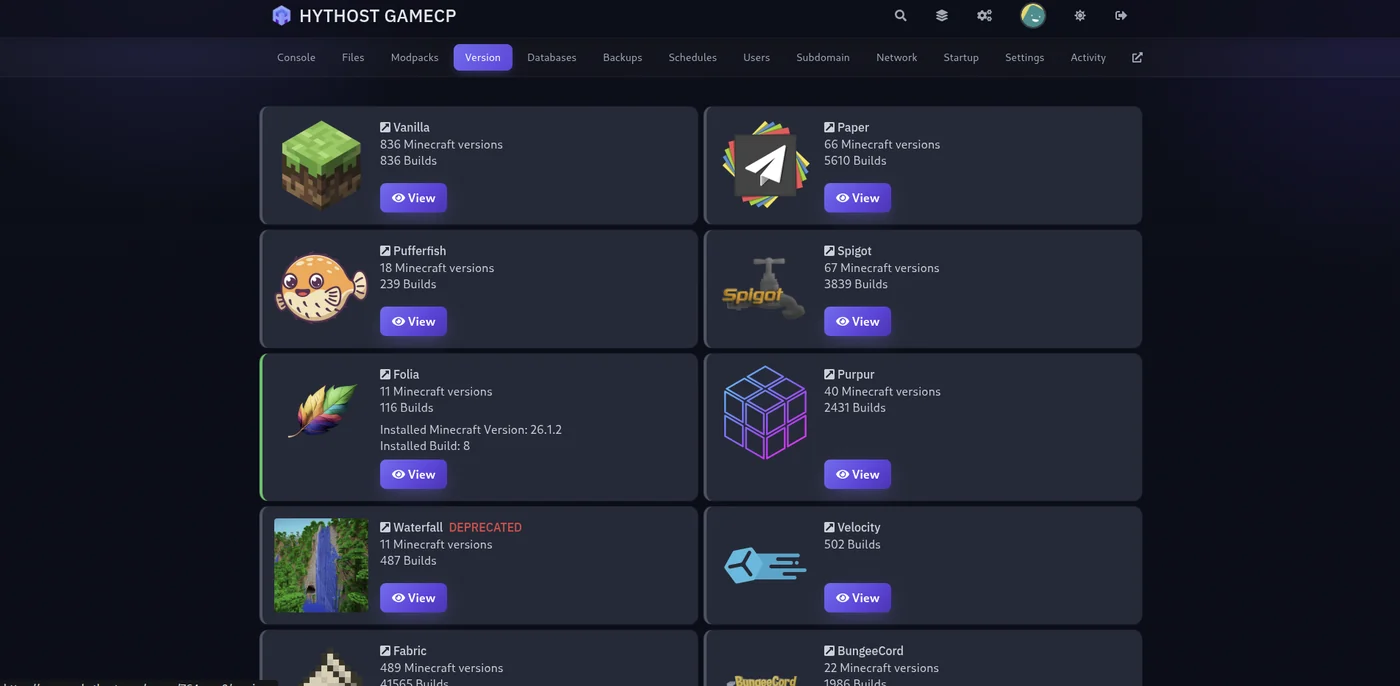
Your world survives the switch. The version changer swaps the server jar, not your save — builds, players and progress stay intact. That means you can start simple on Vanilla, move to Paper the day you want your first plugin, and try a modpack on Forge later, all on the same world and the same plan. Every Minecraft hosting plan ships with the version changer, a one-click modpack installer, NVMe SSD storage, high-clock Ryzen and Intel i9 CPUs, Voxility DDoS protection and a 99.9% Uptime SLA. If you get stuck, live chat is available 8 AM – 11 PM (Chișinău time).
Frequently asked questions
For most people, Paper. It plays exactly like vanilla, performs far better under load, and supports plugins that install server-side only — so players connect with a normal client. Run plain Vanilla if you only want a small survival world with friends and no add-ons, and a mod loader like Forge, NeoForge or Fabric if you want mods or a modpack. There is no single best for everyone — the best is the one that matches whether you want plugins, mods or neither.
Paper, in almost every case. Paper is built on top of Spigot and runs the same Bukkit and Spigot plugins, but with significantly better performance and more optimization options. Spigot is the older project and today mainly matters for legacy setups or the occasional plugin that specifically expects it. If you are starting fresh, there is no practical reason to pick Spigot over Paper.
Gameplay-wise, yes. Paper keeps vanilla mechanics and world generation intact — players cannot tell the difference from the game itself — while rewriting parts of the server for speed and adding plugin support. It is not a mod loader and it does not change the game, so "vanilla vs Paper" is really a question of performance and plugins, not of how the game plays. Your players still join with an unmodified client.
Not with the standard software — plugin servers (Paper, Spigot, Purpur) and mod loaders (Forge, NeoForge, Fabric) are separate worlds. There are hybrid projects (such as Sponge, or Fabric with a plugin bridge) that run some plugins alongside mods, but they are an advanced, less stable setup. For almost everyone the right move is to decide whether your server is a plugin server or a modded server, and commit to one.
It depends on the family. With a plugin server (Vanilla, Paper, Spigot, Purpur) players install nothing — they connect with a normal Minecraft client. With a mod loader (Forge, NeoForge, Fabric) every player must install the same mods as the server, which is why servers hand out a modpack that installs everything in one step. This client-download difference is the single biggest practical reason to prefer plugins when they can do what you need.
Yes. Your world is a separate set of save files, so changing the server software does not touch it. On a HytHost plan the GameCP version changer swaps between Vanilla, Paper, Purpur, Forge, Fabric and the rest — and picks the matching Java version — in a couple of clicks, with your builds and progress intact. You can start on Vanilla and move to Paper or a modpack whenever you like, on the same world.
Not sure? Start on Paper — switch anytime.
Launch a Minecraft server on the software this guide recommends, and change to Purpur, Forge, Fabric or a full modpack in one click if you change your mind. Your world comes with you.
Live chat 8 AM – 11 PM (Chișinău time) · tickets answered during business hoursWas this guide helpful?

