How to Host a Discord Bot 24/7
On this page
Writing a Discord bot is the easy part. Keeping it online 24/7 — responding at 3 a.m., surviving a crash, reconnecting after a network blip — is where most bots quietly die. A bot only works while the program running it stays on, and your laptop does not.
This guide takes you from an empty Developer Portal to a bot that never sleeps. First you create the bot and its token, then you pick where to run it: free on your own machine (with honest caveats), or on cheap always-on hosting that keeps it up for you. It applies whether you built your bot in Discord.js or discord.py.
What "hosting a bot 24/7" actually means
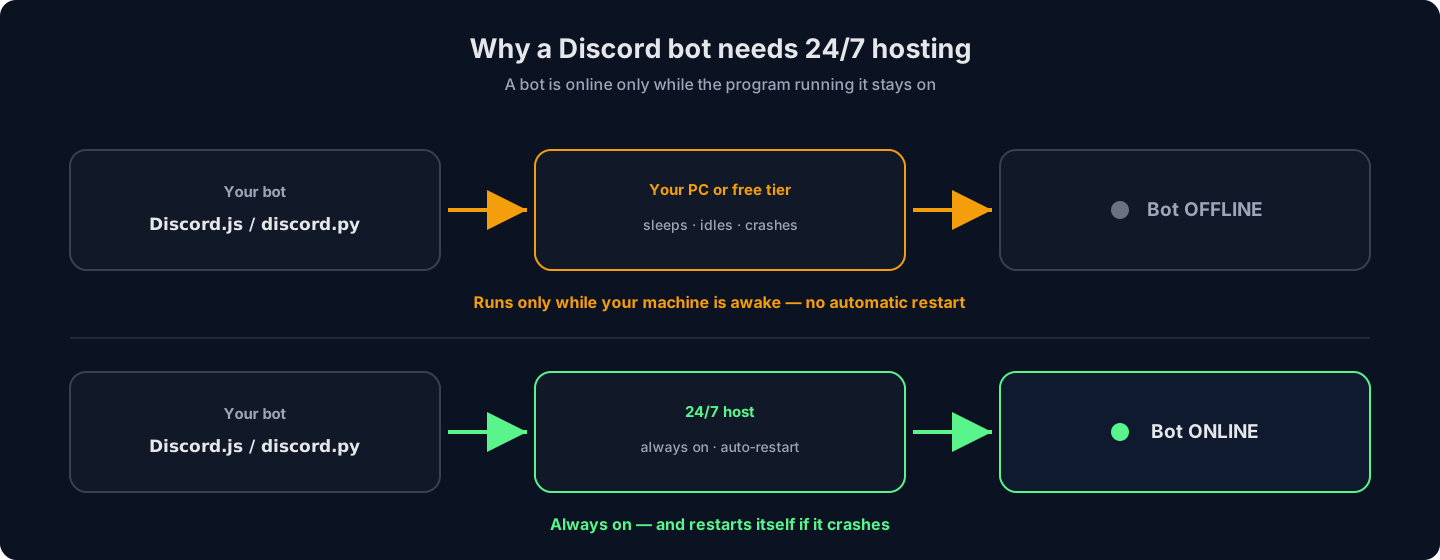
A Discord bot is a small program that logs into Discord and stays connected, listening for events. "Hosting it 24/7" simply means that program runs without stopping — through the night, through reboots, and through crashes (by restarting itself). Three things make that happen:
- A bot application and token. Created once in the Discord Developer Portal — the token is the bot's password.
- Your bot's code. Usually Discord.js (Node.js) or discord.py (Python). This guide is framework-agnostic; the hosting steps are the same.
- Somewhere that is always on. The one requirement people underestimate — and the whole reason paid hosting exists.
If any of those stops, the bot goes offline and shows as grey in your member list. Everything below is about making sure the third one never does.
Step 1: Create your bot and get its token
Every bot starts in the Discord Developer Portal. This part is free and takes a few minutes.
- Create an application. Go to discord.com/developers/applications, click New Application, and name it.
- Add the bot and copy the token. Open the Bot tab, then Reset Token and copy it. This token is the bot's password — treat it like one; anyone with it controls your bot.
Never put your token in your code or a public repo. Leaked tokens are found and abused within minutes. Store it in an environment variable or your host's secrets, and load it at runtime.
- Enable the intents you need. Still on the Bot tab, switch on the Privileged Gateway Intents your bot uses (for example Message Content, if it reads message text).
- Invite the bot to your server. Under OAuth2 → URL Generator, tick the
bot(andapplications.commands) scopes, choose the permissions your bot needs, and open the generated link to add it to a server you manage.
Your bot now appears in the member list — offline, because nothing is running its code yet. That is the next choice.
Path A: Run it yourself (free, with real caveats)
You can run a bot with no hosting bill at all. It is the right call for testing and learning — just know exactly what you are signing up for.
- Run it on your own computer. Install Node.js or Python, put your token in a
.envfile, install dependencies and start it:npm install node index.js # Discord.js pip install -r requirements.txt python bot.py # discord.py
The bot is online — for exactly as long as that terminal stays open and your PC stays awake. - Or use a free cloud tier. Services with free plans can run a small bot, but nearly all of them sleep idle apps, cap monthly CPU-hours, or need a keep-alive hack to stay awake — which often breaks and violates their terms. Every free option is compared, one by one, in the guide to free 24/7 Discord bot hosting.
Good for
- Development and testing — zero cost
- Learning how your bot behaves live
- Bots you do not mind restarting by hand
Why it fails as "24/7"
- Your PC sleeps, reboots for updates, or you simply close the laptop — bot offline
- Free tiers sleep, throttle, or cut you off after a quota
- No automatic restart when the bot crashes
- Your home IP and electricity bill are doing the work
Skip the keep-alive hacks — HytHost bot hosting keeps your Discord bot online 24/7 from €0.89/mo, with automatic restarts.
See bot hostingPath B: Host it 24/7 on always-on hosting
Dedicated bot hosting is a small slice of an always-on server that exists to do one thing: keep your bot running. On HytHost Discord bot hosting it starts at a couple of euros a month, and there is nothing to keep awake. Here is the whole setup:
- Pick a plan and language. Choose the RAM your bot needs (500 MB is plenty for most bots) and your runtime — Node.js, Python, Java, Go, C#, Bun or Lavalink. Plans start at €0.89/mo and include a database and backups.
- Check out. The server is set up automatically after payment; your panel login arrives by email.
- Upload your code. Drag your project into the web file manager or push it over SFTP. Add your token as a startup variable or in a
.env— not in the code. - Set the startup command. Point the panel at your entry file (
index.jsorbot.py); it installs dependencies frompackage.jsonorrequirements.txtand starts the bot. - Leave it running. The bot stays online around the clock and restarts itself if it crashes. Watch the live console, edit files, and manage backups from the panel.
What you are paying for: the bot stays online with a 99.9% Uptime SLA whether your own devices are on or not, it restarts automatically on a crash, files sit on NVMe SSD behind Voxility DDoS protection, and if you get stuck, live chat support is available 8 AM – 11 PM (Chișinău time).
Keep it online: auto-restart and safe tokens
"24/7" is not just "started once" — it is "comes back on its own". A few habits separate a reliable bot from one that vanishes the first time it hiccups:
- Use a process manager (self-hosted). On your own Linux box, run the bot under
pm2(Node.js) or asystemdservice so it relaunches on crash and on reboot. Managed hosting does this for you. - Load the token from the environment. Keep it in an environment variable or your host's secrets and read it at runtime — never commit it. If it ever leaks, reset it in the Developer Portal immediately.
- Handle reconnects. Discord.js and discord.py reconnect to the gateway automatically; do not build logic that hard-exits on a disconnect.
- Watch your logs. Most "my bot went offline" mysteries are an unhandled error crashing the process — the console tells you which line.
RAM, databases and scaling
Most bots are light. A command or moderation bot is happy on 500 MB of RAM. You want more when the bot does heavier work:
- Music bots stream audio and use noticeably more RAM and CPU — size up a tier.
- Big bots in many servers hold more state in memory; large communities of guilds add up.
- Persistent data — levels, economy, settings — needs a database rather than a local file, so it survives restarts. Bot hosting plans here include one.
Only very large bots (around 2,500+ servers) need sharding, which Discord requires at that scale; below it, a single process is simplest. When you outgrow one tier, moving up is a click in the panel — start small and scale when the numbers say so.
Frequently asked questions
Running one can be free — on your own PC, or on a free cloud tier — but that is rarely truly 24/7. Your computer sleeps and reboots, and free tiers usually idle inactive apps or cap your usage. For a bot that is genuinely always online, dedicated bot hosting is the reliable option, and it is cheap: plans start at €0.89/mo.
Yes, and it is great for development. The catch is that the bot is online only while the program is running and the PC is awake — close the terminal, sleep the laptop, or reboot for an update, and the bot drops offline with no automatic restart. That is why bots meant to be dependable move to always-on hosting.
It means the bot process runs continuously and comes back on its own — through the night, through reboots, and through crashes. Achieving it takes two things: a host that never turns off, and an auto-restart mechanism (a process manager like pm2, or the automatic restart a managed host provides).
Both are excellent. Discord.js (Node.js) is the most popular, with the largest ecosystem and examples. discord.py (Python) is clean and beginner-friendly. Pick the language you are most comfortable in — good hosting supports Node.js, Python and Java, so you are not locked in either way.
Most bots run comfortably on 500 MB. Music bots and bots serving many servers use more, so size up a tier for those. Because bots are light, hosting is cheap — the point you pay for is the "always on", not raw power.
Almost always one of three things: the machine running it stopped (PC asleep, free tier idled), the process crashed with no auto-restart, or an unhandled error is killing it on a specific event — check the console logs. Running it on always-on hosting with automatic restart removes the first two entirely.
Keep your bot online while you sleep
HytHost Discord bot hosting runs your Node.js, Python, Java, Go, C# or Bun bot 24/7 with automatic restarts, a database and backups included — from €0.89/mo, set up automatically after payment.
Live chat 8 AM – 11 PM (Chișinău time) · tickets answered during business hoursWas this guide helpful?

