Minecraft Crossplay: Java and Bedrock Together with Geyser
On this page
Java and Bedrock are two separate versions of Minecraft that normally cannot play together — which is why the friend on an Xbox or a phone can never join the PC server. Geyser fixes exactly that: it lets Bedrock players connect to a Java server, so everyone shares one world regardless of device.
This guide shows how crossplay actually works, how to set up Geyser and Floodgate on your server step by step, how console and mobile players connect, and the fastest way to get it running on managed hosting. If you host the server, you control the crossplay.
What Geyser and Floodgate actually do
Geyser is a free, open-source proxy that translates Bedrock's network protocol into Java's on the fly. Your server stays a normal Java server; Geyser sits in front of it and makes Bedrock clients look like Java clients to it. That is why crossplay always runs on a Java server, never the other way around.
Floodgate is its companion. Normally a Java server requires every player to own a Java account; Floodgate lets Bedrock players join without one, using their existing Bedrock identity. Run them together and a console or mobile player can hop onto your server with nothing extra to buy.
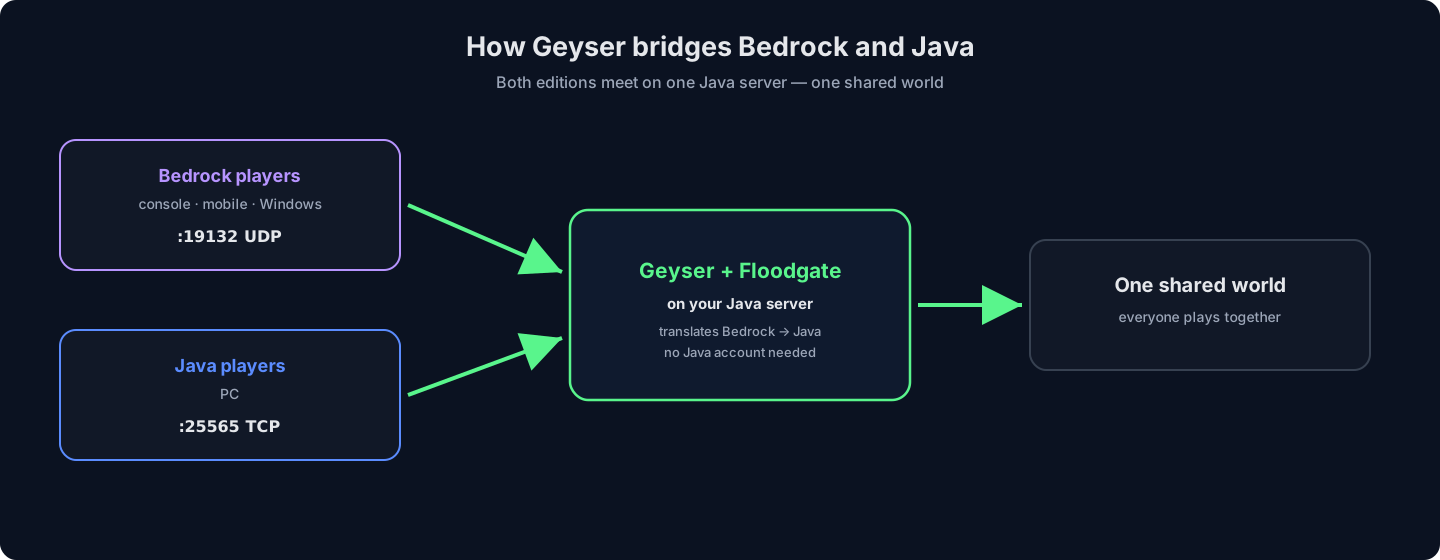
A few honest limits: the two editions must be on matching versions, and a handful of Java-only mechanics or deep mod features do not translate perfectly. For survival, minigames and the vast majority of plugins, crossplay is seamless.
What you need for crossplay
Crossplay has a short shopping list:
- A Java server that supports plugins. Paper (or Spigot/Purpur) is the standard — Geyser installs as a plugin in one step. Pure Vanilla can still do crossplay, but through a standalone proxy instead (covered below). New to server software? See best Minecraft server software.
- Geyser and Floodgate. Both are free from GeyserMC, matched to your server type.
- Bedrock's port open: UDP 19132. Java uses TCP 25565; Bedrock players reach Geyser on UDP 19132, so both need to be reachable.
- Matching versions. Keep Geyser current so it supports the Bedrock and Java versions your players are on.
If you have not built the server yet, start with how to make a Minecraft server — then add crossplay on top.
Step by step: install Geyser and Floodgate as plugins
This is the common route, on a Paper or Spigot server. It is the same pattern as any plugin — see installing plugins for the full walkthrough.
- Download Geyser and Floodgate. Get
Geyser-Spigot.jarandfloodgate-spigot.jarfrom the GeyserMC downloads for your platform. - Drop them in the plugins folder. Upload both JARs into your server's
plugins/directory over SFTP or the file manager. - Restart the server. On the first start each plugin generates its config; the console should report both loading without errors.
- Check the Bedrock port. In
plugins/Geyser-Spigot/config.ymlconfirm the bind port is19132. Leaveauth-typeasfloodgateso Bedrock players join without a Java account. - Open UDP 19132. Self-hosted, forward UDP 19132 on your router alongside your Java port. On hosting, the port is already open.
- Test from Bedrock. In the Bedrock client, add a server with your address and port 19132. If you spawn into the same world your Java players see, crossplay works.
Skip the port forwarding — a HytHost Minecraft server runs Geyser crossplay with the Bedrock port already open.
See Minecraft plansVanilla servers and proxy networks
Not every server takes plugins. Two variations cover the rest:
- Geyser Standalone. If you run pure Vanilla, or want Geyser on a separate machine, Geyser Standalone runs as its own proxy that points at your Java server's address and port. Floodgate is handled a little differently in this mode, but Bedrock players still connect on 19132.
- Proxy networks (Velocity / BungeeCord). Running several linked servers behind Velocity or BungeeCord? Install the matching Geyser and Floodgate builds on the proxy so Bedrock players reach the whole network through one entry point.
For a single community server, the plugin route above is simplest; reach for these only when your setup calls for it.
How console and mobile players actually join
How a Bedrock player joins depends on their device:
- Mobile, Windows and Bedrock-on-PC. They add a server directly — your address, port
19132— and connect. - Consoles (Xbox, PlayStation, Switch). Consoles do not let players type an arbitrary server address, so they connect through a DNS connector such as BedrockConnect (set as a DNS on the console, it shows a list where they enter your server). This is a console limitation, not a Geyser one — the same trick used for any Bedrock server. Our Bedrock server guide covers the console path in detail.
Once in, Bedrock and Java players share the same world, chat and gameplay — most will not even notice who is on which edition.
The fast way: crossplay on managed hosting
On a HytHost Minecraft server the fiddly parts are already handled. Run a Paper server, install Geyser and Floodgate from the panel's plugin tools (or drop the JARs in plugins/), and the Bedrock port is open for you — no router, no proxy machine to babysit. You get a free subdomain to hand out, Voxility DDoS protection in front of both ports, and a target of 99.9% uptime so the server is there whenever your crossplay group is.
Prefer a pure Bedrock server instead of bridging? That is a different setup — see Minecraft Bedrock hosting. But if you want Java's plugins and mods and your console friends in the same world, Geyser on a Java server is the answer, and it is minutes of work on managed hosting.
Frequently asked questions
Geyser is a free, open-source proxy that lets Bedrock Edition players (console, mobile, Windows) join a Java Edition server. It translates between the two editions' network protocols in real time, so your server stays a normal Java server while Bedrock players connect to it as if it were their own edition.
Not if you run Floodgate alongside Geyser. Floodgate lets Bedrock players authenticate with their existing Bedrock account, so they join your Java server without buying or linking a Java account. Without Floodgate, a Java account would be required.
Yes, with one extra step: consoles cannot type a custom server address, so players use a DNS connector such as BedrockConnect to reach your server. That is a console restriction that applies to any Bedrock server, not something Geyser adds. Mobile and Windows Bedrock players can add your address and port 19132 directly.
It runs on a Java server. Paper (or Spigot/Purpur) is easiest because Geyser installs as a plugin; pure Vanilla works through Geyser Standalone as a separate proxy; and Velocity/BungeeCord networks install Geyser on the proxy. What you cannot do is add Java players to a Bedrock-only server — crossplay is always Java-hosted.
Bedrock connects over UDP port 19132, while Java uses TCP 25565. With Geyser installed, both need to be reachable — on self-hosted setups forward UDP 19132 on your router; on managed hosting it is already open.
A few. Java and Bedrock must be on matching versions, and some Java-only mechanics or deep mod features do not translate perfectly to Bedrock clients. For survival, minigames and the large majority of plugins it is seamless — most players never notice the difference.
Get everyone in the same world
Run a Paper server on HytHost, add Geyser and Floodgate, and your console and mobile friends join your Java world in minutes — the Bedrock port is open and DDoS-protected out of the box.
Live chat 8 AM – 11 PM (Chișinău time) · tickets answered during business hours
