How to Make a Modded Minecraft Server
On this page
Making a modded Minecraft server means running a mod loader — Forge, NeoForge or Fabric — in place of the plain server, then either installing a ready-made modpack or assembling your own mod list. This guide covers both routes end to end: self-hosting a pack on your own PC for free, and the one-click hosted way where the loader, Minecraft version and Java are all handled for you.
Before you touch a single file, it helps to know the one rule that trips up almost everyone: mods are not plugins. Getting that distinction right decides which loader you run, whether your friends have to install anything, and how much RAM you actually need — so that is where we start.
Mods vs plugins vs modpacks: know which one you want
These three words get used interchangeably, but they are three different things — and picking the wrong one is the most common reason a "modded" server turns out to be the wrong setup entirely.
- Mods change the game itself — new blocks, mobs, dimensions, machines, magic. They run on a mod loader (Forge, NeoForge, Fabric or Quilt), and the catch is that every player must install the exact same mods on their side. Join a Forge server with the wrong mods and you are kicked before the world even loads. That client-side matching is the whole reason modpacks exist.
- Plugins are server-side only. They run on Paper (or Spigot/Purpur) and add things like ranks, land protection, economies and minigames — without touching the base game. Players connect with an unmodified client and download nothing. If all you want is a survival server with permissions and anti-grief, you want plugins, not mods, and that is a simpler path: see how to install plugins on a Minecraft server.
- Modpacks are a curated bundle: a set of mods, their config files, a specific loader and a target Minecraft version, published on CurseForge, Modrinth, Feed The Beast or Technic. A pack is the practical way to run and share mods, because everyone installs the same bundle in one click instead of hand-matching dozens of files.
Forge, NeoForge, Fabric or Quilt: choosing a loader
A mod loader is the layer that lets mods hook into Minecraft. Each mod is built for one loader, so the loader you run has to match the mods you want. Four names cover essentially everything:
| Loader | Best for | Notes |
|---|---|---|
| Forge | Classic big "kitchen-sink" packs | The veteran loader with the deepest back-catalogue of mods. Heavier, but most large content packs grew up here. |
| NeoForge | Modern Forge-style packs (1.20.1+) | A community fork of Forge that most new Forge-style development now targets. Recent "Forge" packs are increasingly NeoForge under the hood. |
| Fabric | Performance mods and lighter packs | Lightweight and quick to update to new Minecraft versions. Home of Sodium, Lithium and other performance mods. |
| Quilt | Specific Quilt-only mods | A fork of Fabric that runs most Fabric mods. Smaller ecosystem — only pick it if a mod you want requires it. |
Loaders are only half the picture; the other half is whether you need one at all. For a plain comparison of vanilla, Paper, Forge and Fabric as server types, see the best Minecraft server software. If you already know you want a pack, our modded Minecraft hosting is pre-sized for Forge, NeoForge and Fabric packs.
Path A: Self-host a modpack on your own PC
This route is free and teaches you how modded servers really fit together. It assumes you have already picked a pack — for the router, EULA and port-forwarding basics that are identical to any server, lean on the main Minecraft server guide. Below we focus on what is actually different about a modded one.
- Download the pack's server files. On the pack's CurseForge page, open Files and grab the Server Pack (Modrinth and Feed The Beast have the same "server" download). This is not the client pack you play with — the server files are a separate archive that already includes the right loader.
- Install the Java the pack asks for. This is the step that breaks the most servers. Current Minecraft versions run on Java 25; 1.20.5 through 1.21 run on Java 21; and older packs on 1.16.5 or 1.12.2 (RLCraft, for example) still need Java 8 or 17. Read the pack's stated requirement and install the matching free Temurin build from adoptium.net.
- Unzip and accept the EULA. Extract the server pack into a new, empty folder. Run the start script once, open the
eula.txtit creates, changeeula=falsetoeula=true, and save — exactly as for a vanilla server. - Run the pack's start script. Modpack server files ship with their own launcher —
run.batorstart.sh(sometimesrun.sh) — that loads Forge or Fabric for you. Open it in a text editor and set the RAM line (for example-Xmx8G) to fit both the pack and your machine, then run the script. The first launch downloads the loader and can take a few minutes before the console finally reportsDone. - Forward port 25565. Modded uses the same default port as any Java server: forward TCP 25565 on your router to your PC. The full walkthrough — including the warning about exposing your home IP — is in the main setup guide.
- Give friends the client pack. Everyone who joins must install the same pack at the same version through a launcher like CurseForge, Modrinth or Prism. Send them the exact pack name and version number — a single mod out of place and they cannot connect.
-Xmx value both match what the pack asks for.Path B: One-click modpack hosting
On a hosted plan, the whole of Path A — the right Java, the loader download, the start script, the router — collapses into a search box. A modded Minecraft hosting plan runs the same server software in a datacenter, already sized for packs and behind real DDoS protection. Here is the entire setup:
- Order a modded plan. Pick your RAM on the modded Minecraft hosting page using the sizing below. The server is provisioned automatically, and your GameCP panel login arrives by email within moments — no ticket, no waiting on a human.
- Install your pack in one click. Open the modpack installer in the panel, search CurseForge, Feed The Beast, Modrinth or Technic, pick your pack and install it. The installer sets the loader, the Minecraft version and the correct Java automatically — the Java mismatch that breaks self-hosted packs simply cannot happen here.
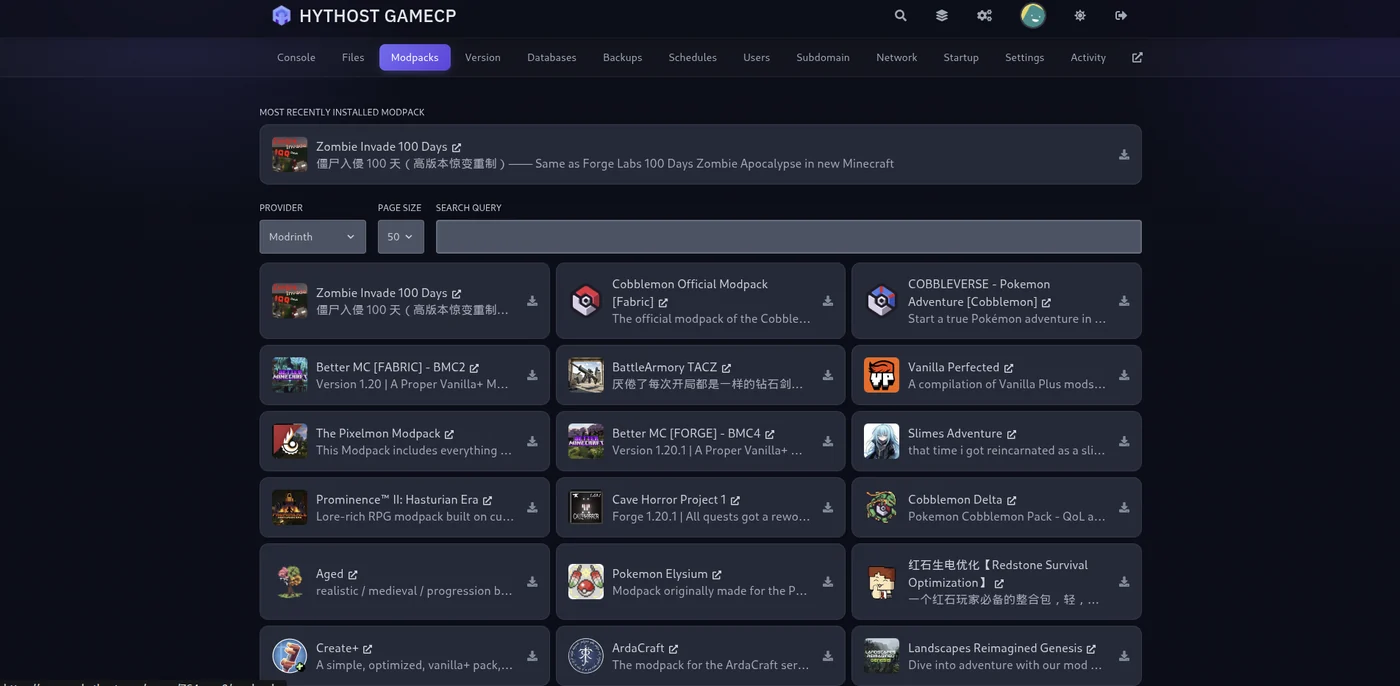
The one-click modpack installer: search a provider, choose a pack, and it sets the loader, Minecraft version and Java for you. - Prefer to build your own mod list? The version changer switches between Forge, NeoForge, Fabric, Paper and any Minecraft version in a couple of clicks, matching the Java version each time — then you add your own mods over SFTP or the file manager.
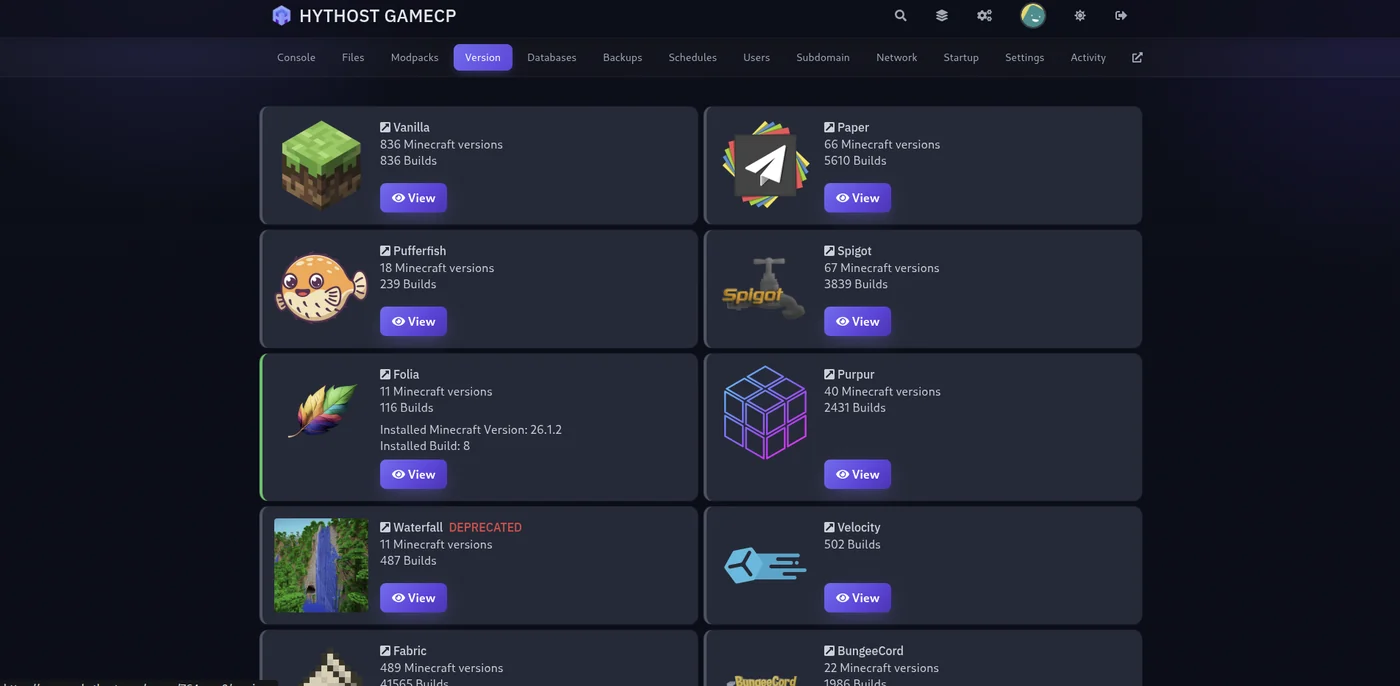
The version changer: pick a loader and Minecraft version, and the matching build — with the right Java — installs itself. - Invite your friends. Share the pack name and version so everyone runs the same client, and give them your address — we can set up a free subdomain like
play.yourname.comto make it memorable. - Back up before every pack update. Modpack updates are the riskiest thing you will ever do to a world. Take a one-click backup in the panel first, and if an update misbehaves you restore in seconds.
What you are paying for, concretely: no Java guessing and no port forwarding, a target of 99.9% uptime whether your PC is on or not, Voxility DDoS protection, and worlds on NVMe SSD storage. Modded worlds lean hard on a single CPU thread, which is why plans here run high-clock Ryzen and Intel i9 CPUs rather than many slow cores. Already running a pack at home? Migration is free — support will move it for you, and live chat is available 8 AM – 11 PM (Chișinău time).
Skip the loader and Java setup — one-click install any Forge, Fabric or NeoForge modpack on a HytHost server built for modded.
See modded plansHow much RAM does a modded server need?
Mods are the real memory eaters, because each one loads its own code, items and world generation into RAM the moment the server starts — before a single player joins. That is the key difference from vanilla sizing: modded RAM is driven by the pack, not the player count.
| Pack type | RAM to aim for |
|---|---|
| Light or performance-focused packs (often Fabric) | 5-8 GB |
| Most CurseForge modpacks | 9-12 GB |
| Heavy kitchen-sink packs (ATM, RLCraft) or big communities | 16 GB+ |
For the full breakdown — including how player count and plugins factor in — see how much RAM a Minecraft server needs.
Popular modpacks and what they need
A handful of packs come up again and again. Here is what each one runs on and roughly how much to give it — always cross-check the pack's own page, since requirements shift between versions.
| Modpack | Loader | RAM to aim for | Good for |
|---|---|---|---|
| All the Mods 10 (ATM10) | NeoForge (1.21) | 16 GB+ | Everything at once — the classic kitchen-sink pack |
| Better MC | Forge or Fabric | 9-12 GB | Curated exploration and adventure, several editions |
| RLCraft | Forge (1.12.2) | 16 GB+ | Brutal hardcore survival — an older Java 8 pack |
| Create (Above and Beyond) | Forge | 5-8 GB | Engineering and automation, lighter on mod count |
| Prominence II | Fabric | 9-12 GB | RPG questing with strong performance tuning |
Frequently asked questions
A plugin runs only on the server and adds features like ranks, protection or minigames without changing the base game — players join with a normal, unmodified client. A mod changes the game itself and must be installed on both the server and every player's computer. If you only want permissions and anti-grief, choose plugins; if you want new blocks, mobs or dimensions, you need mods.
Yes. Modded Minecraft matches mods on both ends, so everyone who joins must install the same pack at the same version through a launcher such as CurseForge, Modrinth or Prism. This is exactly why modpacks exist — instead of hand-matching dozens of files, each player installs one bundle in a click. Send friends the exact pack name and version so nothing mismatches.
If you are installing a modpack, you do not choose — the pack dictates its loader and Minecraft version, and you just install it. You only pick a loader when building your own mod list: Forge and NeoForge for the big content packs, Fabric for lighter, performance-focused setups, and Quilt only when a specific mod requires it. See our server software guide for the full comparison.
Aim for 5-8 GB for light or Fabric performance packs, 9-12 GB for most CurseForge modpacks, and 16 GB or more for heavy kitchen-sink packs like All the Mods or RLCraft. Modded RAM is driven by the pack rather than the number of players, since every mod loads into memory at startup. The RAM guide has the full breakdown.
You can, but a plan sized for modded is the better fit — packs need far more RAM than a vanilla or plugin server. Our modded Minecraft hosting plans are pre-sized for Forge, NeoForge and Fabric packs, and the one-click installer sets the loader, version and Java for you. A plain Minecraft plan is aimed at vanilla and plugin (Paper) servers instead.
The two usual culprits are a Java mismatch and too little RAM. A pack built for one Java version crashes on another — current Minecraft needs Java 25, but older packs like RLCraft still need Java 8 — and a pack starved of memory dies during world generation. Check that your Java version and your -Xmx value both match what the pack asks for before looking anywhere else. On a hosted plan the installer handles Java for you, so this failure does not occur.
Ready to run your modpack without the setup?
Launch a modded Minecraft server built for it — one-click install any CurseForge, Modrinth, FTB or Technic pack, with the loader, version and Java sorted for you. Free migration if you already run a pack.
Live chat 8 AM – 11 PM (Chișinău time) · tickets answered during business hours
